

SOCKS5 Proxy Server
Estimated Deployment Time: 10 Minutes
What it is
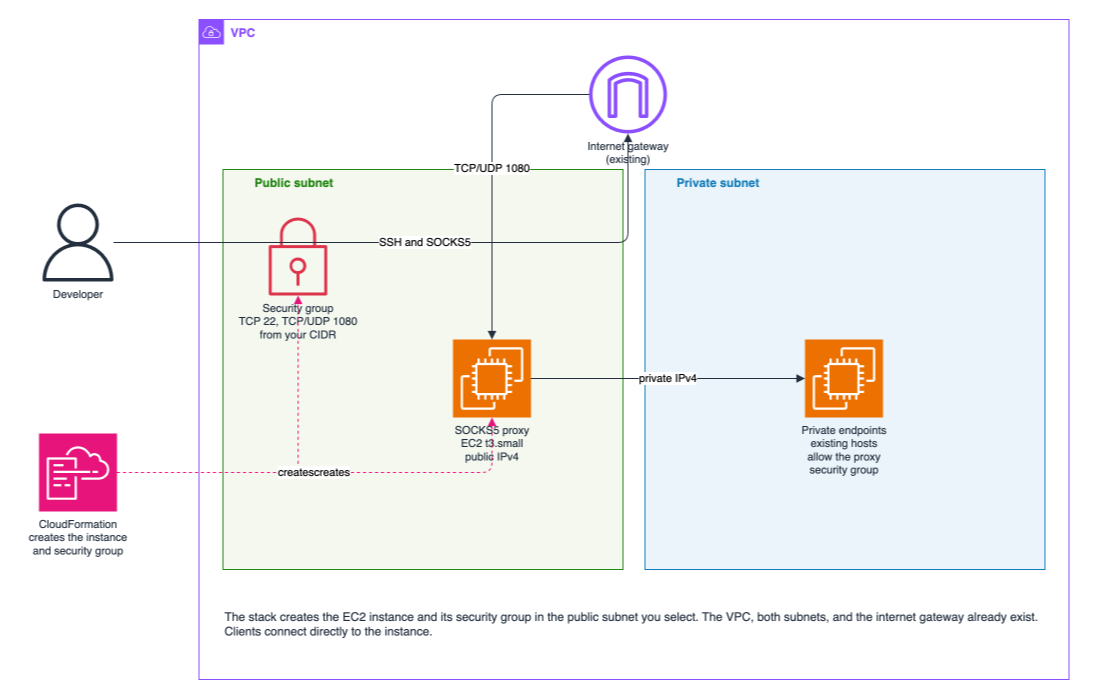
The SOCKS5 Proxy Server is one EC2 instance in a public subnet of your VPC. Developers point their tools at a single endpoint, TCP port 1080, and name the destination on each request. A new private IP address, DNS name, or port does not need a host-port map, a security-group change on the proxy, or a reboot.
You launch it with CloudFormation from AWS Marketplace. The stack creates the instance and its security group in a public subnet you already have. The VPC, the subnets, and the internet gateway stay as they are.
How traffic moves
A developer connects from an address inside the CIDR you enter at launch. The security group allows only that CIDR, on TCP 22, TCP 1080, and UDP 1080. There is no default that opens those ports to the internet, and 0.0.0.0/0 is rejected.
After the client authenticates, the proxy dials the destination from the instance private IPv4. Private subnet routes, peering, Transit Gateway, and VPN routes are used as they already exist. On each private target, allow inbound traffic from the proxy security group printed in the stack outputs.
Two request types are supported:
- TCP CONNECT. The client asks for
host:port. Domain names are resolved on the instance, which is what makes private DNS names work. Clients must send the hostname to the proxy (curl --socks5-hostname) instead of resolving it on the laptop. - UDP ASSOCIATE. The client uses the same host and UDP port 1080 after the TCP association. Only the IP address that authenticated the TCP connection may send UDP.
The proxy refuses destinations that would let a SOCKS user read instance metadata or talk to the proxy itself. That includes 169.254.0.0/16, the EC2 IPv6 metadata address, loopback, and the instance public and private addresses.
SOCKS5 passwords travel in cleartext. Keep the security group limited to developer addresses.
How to use it
- Subscribe to the SOCKS5 Proxy Server in the AWS Marketplace and launch the CloudFormation stack.
- Choose the VPC you need to reach and a public subnet in it. The subnet route table needs a route to the internet gateway and a route to your private targets.
- Select an EC2 key pair. SSH password login is disabled.
- Enter a developer CIDR for
RemoteAccessCidr, such as203.0.113.4/32. Do not use0.0.0.0/0. - Wait until the stack status is
CREATE_COMPLETE. The stack finishes only after the proxy is listening. - Open the stack outputs:
SocksUsernameissocks.ProxyAddressis the public host and port1080.SecurityGroupIdis the group to allow on private targets. There is no password in the outputs. The initial SOCKS5 password is the EC2 instance ID.
- SSH to the instance as
ubuntuwith the key pair you selected. The first interactive login must replace the instance ID with a SOCKS5 password of at least 16 characters, with no colon. The instance ID stops working as a password after that change. A non-interactive SSH session does not change the password. - On each private target, allow inbound traffic from
SecurityGroupId.
Point clients at ProxyAddress and send hostnames to the proxy. Replace NEW_PASSWORD with the password you set, and PROXY_ADDRESS with the output:
curl -U 'socks:NEW_PASSWORD' --socks5-hostname PROXY_ADDRESS http://10.0.2.15:8080/
curl -U 'socks:NEW_PASSWORD' --socks5-hostname PROXY_ADDRESS https://orders.internal:443/
SSH through the proxy to a private host:
ssh -o ProxyCommand='ncat --proxy-type socks5 --proxy PROXY_ADDRESS --proxy-auth socks:NEW_PASSWORD %h %p' [email protected]
If you stop and start the instance, restart the proxy so UDP replies advertise the new public IPv4.
Frequently Asked Questions
What size instance does it use?
A t3.small.
Does the proxy decrypt HTTPS?
No. A CONNECT tunnel carries the bytes between the client and the destination. The proxy sees the destination host and port, and the SOCKS username and password. It does not terminate TLS.
Do I need an IAM role on the instance?
No. Forwarding uses the subnet route table. An instance role is optional, and only if you want Session Manager instead of SSH. Attach AmazonSSMManagedInstanceCore and nothing else.
Where is the initial password?
The image does not contain one. The initial SOCKS5 password is the EC2 instance ID, shown in the EC2 console. It is not a stack output. The first interactive SSH login must replace it, and the instance ID stops working after that change.